
Quick Links
- What is governance information?
- Why governance information matters
- Who can see governance information?
- Accessing governance information
- Viewing governance information
- Section A: Health and Safety
- Section B: Sustainability
- Section C: General Information
- Important information about governance data
- Using governance information
- Requesting governance information
- Best practices for tour operators
- Common use cases
- Troubleshooting
- Need help?
What is governance information?
Governance information shows a supplier's compliance and sustainability credentials:
Health & Safety:
- COVID-19 protocols
- Fire safety measures
- First aid provisions
- Emergency procedures
- Staff training
- Safety certifications
Sustainability:
- Environmental certifications
- Carbon offset programmes
- Water conservation
- Waste management
- Community involvement
- Local sourcing
General Information:
- Tourism board memberships
- GDPR compliance
- Data handling policies
- Public liability insurance
- Operating licences
- Industry accreditations
Why governance information matters
For choosing suppliers:
- Verify compliance standards
- Meet duty of care requirements
- Satisfy insurance obligations
- Support sustainable tourism
- Build client confidence
For your business:
- Mitigate risks
- Demonstrate due diligence
- Align with corporate values
- Meet regulatory requirements
- Support responsible tourism
Who can see governance information?
Visible to:
- Tour operators using Wetu
- Travel agents with Product Manager access
- DMCs researching suppliers
Not visible to:
- End travellers/clients
- Itinerary outputs
- iBrochure viewers
- Public domain
Trade-only information for professional decision-making, not marketing.
Accessing governance information
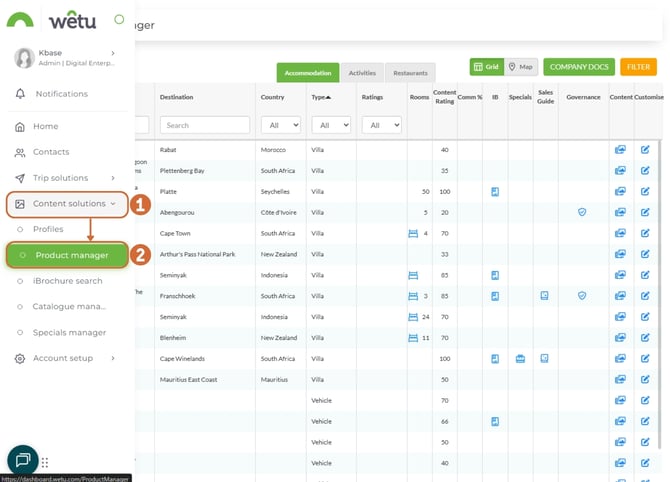
Step 1: Open Product Manager
1. Navigate to Content Solutions
2. Click "Product Manager"
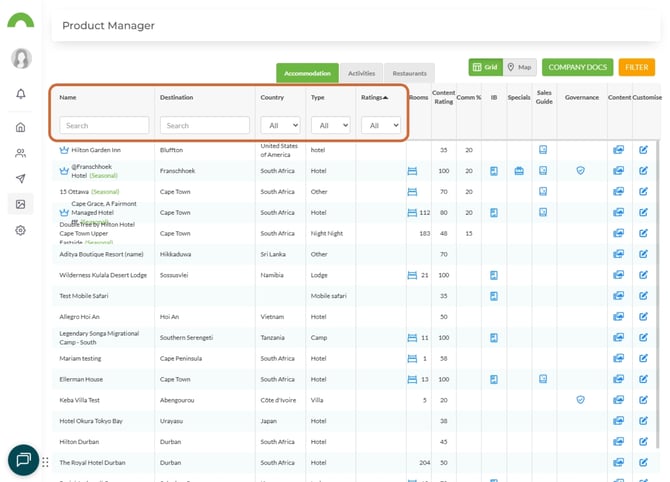
Step 2: Find your supplier
1. Use filters to locate the supplier:
- Search by name
- Filter by destination
- Filter by property type
Step 3: Click Governance icon
Find the Governance icon for your relevant supplier and click it.
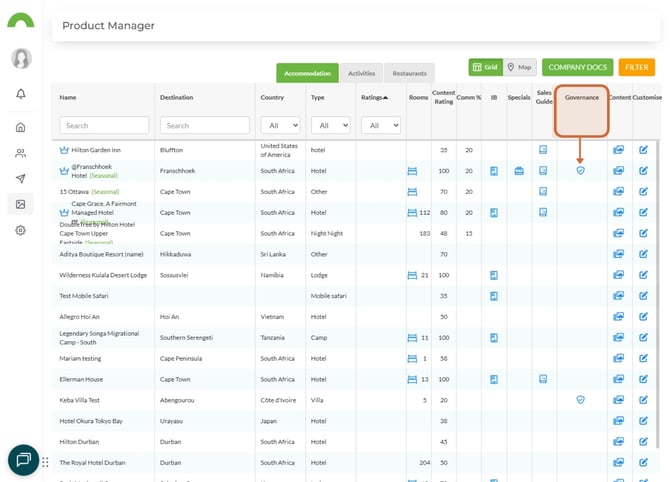
The governance information panel opens.
Viewing governance information
Information is organised into sections
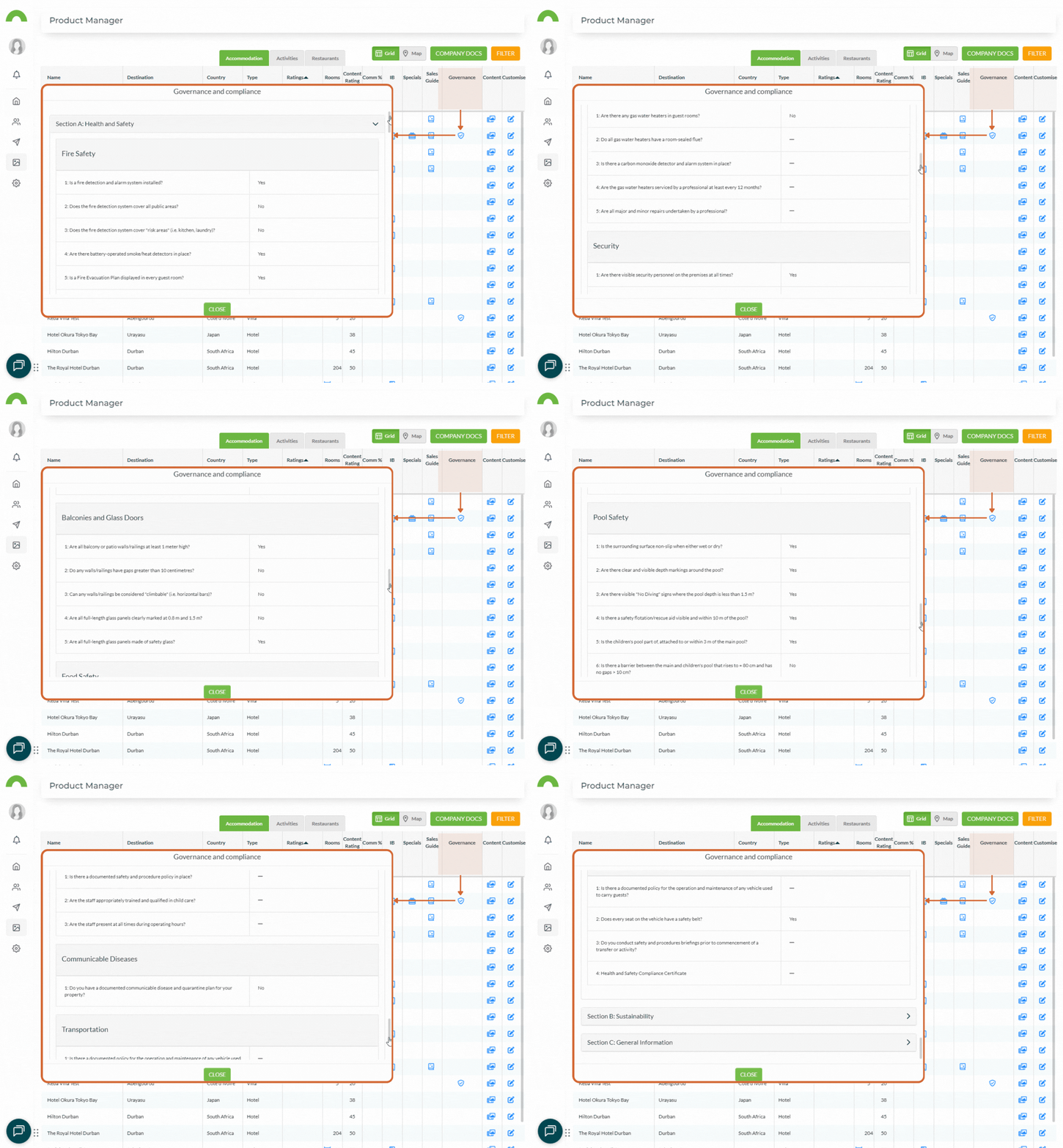
Section A: Health and Safety
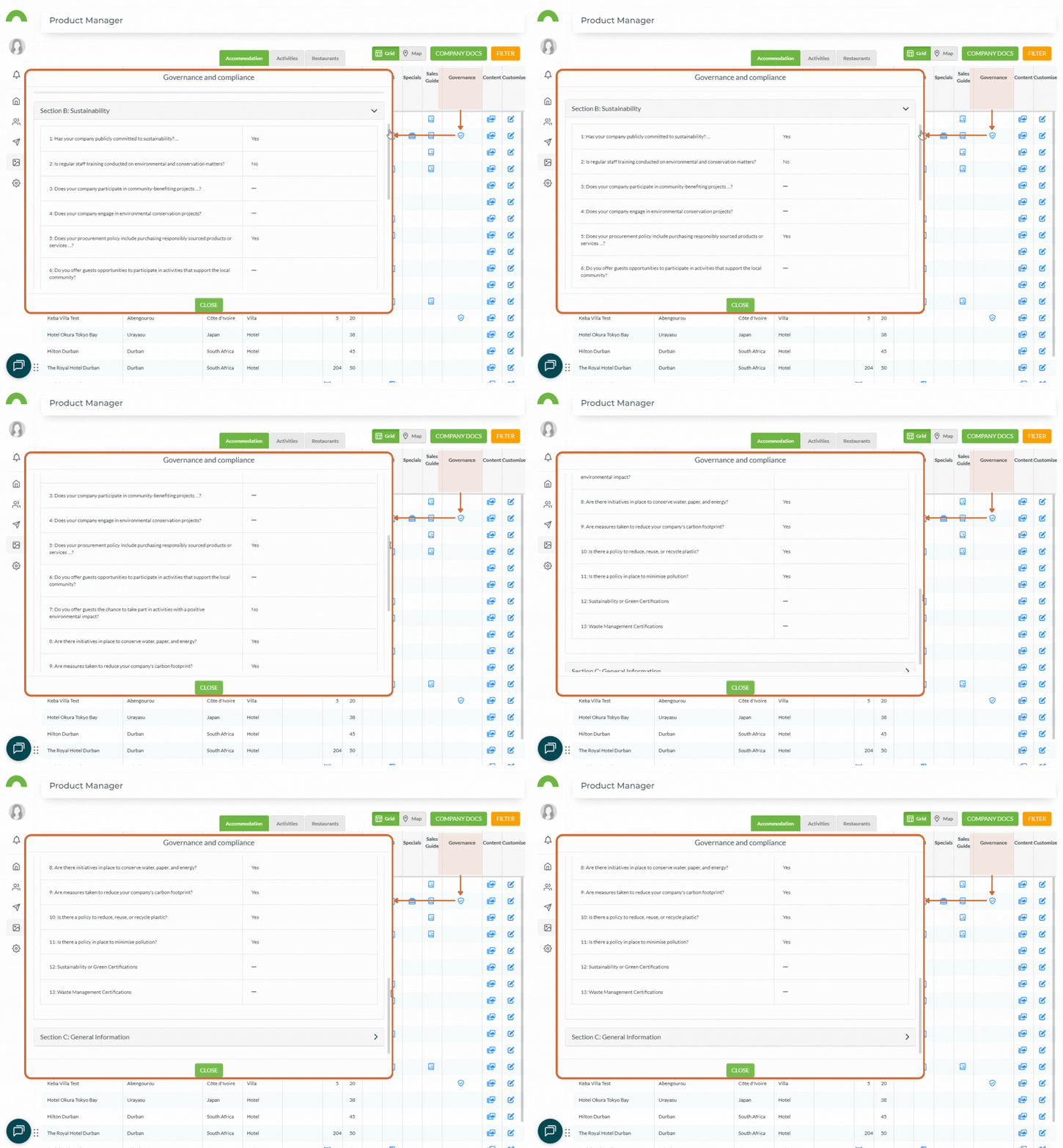
Section B: Sustainability
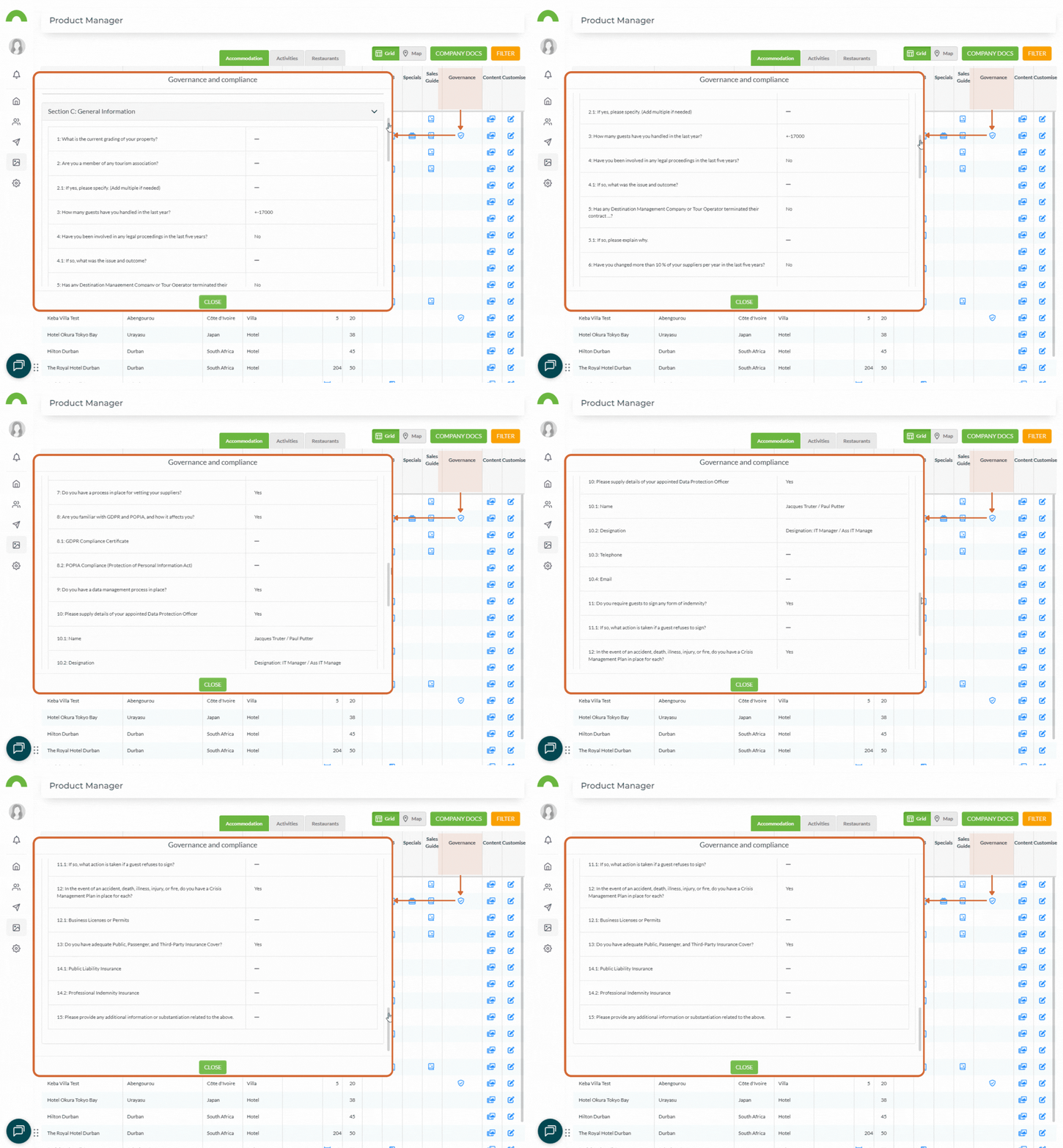
Section C: General Information
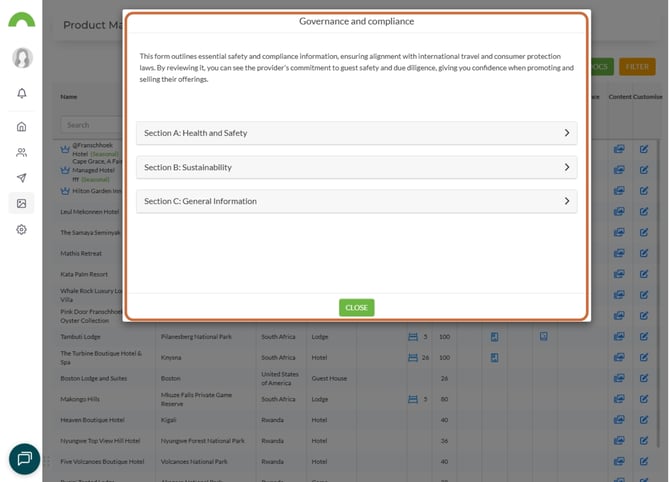
Expand sections to view details
Click on each section to expand and view the information.
Section A: Health and Safety
What you'll see:
Fire safety:
- Fire extinguishers
- Smoke detectors
- Emergency exits
- Evacuation procedures
- Staff training
First aid:
- Trained staff on-site
- First aid kits
- Emergency medical procedures
- Nearby medical facilities
Safety measures:
- Security personnel
- CCTV systems
- Safe deposit boxes
- Emergency lighting
- Backup power
Certifications:
- Links to safety certificates
- Inspection reports
- Compliance documentation
Section B: Sustainability
What you'll see:
Environmental certifications:
- Fair Trade Tourism
- Travelife
- Green Key
- EarthCheck
- LEED certification
- Other eco-certifications
Environmental practices:
- Carbon offset programmes
- Renewable energy use
- Water conservation measures
- Waste reduction and recycling
- Plastic reduction initiatives
Community involvement:
- Local employment policies
- Community projects
- Local sourcing commitments
- Education programmes
- Conservation partnerships
Sustainability documentation:
- Links to certificates
- Policy documents
- Impact reports
Section C: General Information
What you'll see:
Tourism boards:
- Membership details
- Registration numbers
- Accreditations
GDPR and data handling:
- GDPR compliance status
- Data protection policies
- Privacy measures
- Client information handling
Insurance and liability:
- Public liability insurance
- Coverage amounts
- Policy numbers
- Professional indemnity
Operating licences:
- Business registration
- Tourism licences
- Health department approvals
- Environmental permits
Industry memberships:
- Professional associations
- Quality schemes
- Trade organisations
Important information about governance data
Suppliers add their own information
Critical: This information can only be added by suppliers themselves.
You cannot:
- Edit governance information in your account
- Add information on behalf of suppliers
- Modify or update entries
Suppliers must:
- Add their own governance data
- Keep information current
- Upload relevant certificates
- Update when changes occur
Information is trade-only
Governance information is NOT displayed on:
- Itineraries sent to travellers
- iBrochures
- Any client-facing outputs
- Public websites
Only visible in:
- Product Manager (trade users only)
Why? This is professional compliance information for trade decision-making, not marketing content.
Questions about governance information
For questions about loaded information:
- Contact the supplier directly
- Wetu cannot assist with content suppliers have loaded
- Suppliers are responsible for accuracy
To avoid misunderstanding:
- Wetu provides the platform for suppliers to add information
- Wetu does not verify, validate, or edit governance content
- Suppliers are solely responsible for what they upload
Using governance information
When researching suppliers
Check governance before booking:
1. Health & Safety: Verify safety protocols meet standards
2. Sustainability: Confirm eco-credentials align with values
3. General: Check insurance and licensing adequate
Red flags to watch for:
- Missing critical information (e.g., no public liability)
- Expired certificates
- Incomplete sections
- Inconsistent details
For client proposals
Use governance to:
- Confirm duty of care compliance
- Verify sustainability claims
- Check insurance coverage
- Validate certifications
- Demonstrate due diligence
Don't:
- Copy governance info into client itineraries (it's trade-only)
- Make claims based on unverified information
- Rely solely on governance data (verify independently)
For risk management
Governance information helps:
- Identify compliant suppliers
- Mitigate health and safety risks
- Ensure adequate insurance coverage
- Support sustainability goals
- Meet corporate responsibility requirements
Best practice:
- Review governance before contracting
- Update your records when certificates renew
- Flag suppliers with missing information
- Prioritise suppliers with complete governance data
Requesting governance information
If supplier hasn't added information
Contact the supplier:
Email template:
Subject: Request for Governance Information on Wetu
Dear [Supplier Name],
We're currently reviewing suppliers for our upcoming
programmes and noticed your governance information is not
yet complete on Wetu.
Could you please add the following to your governance
section:
- Health and safety protocols and certifications
- Sustainability certifications (if applicable)
- Public liability insurance details
- Operating licences
This information helps us meet our duty of care and
sustainability commitments. We'd appreciate this being
added within the next 2 weeks.
Thank you for your cooperation.
Best regards,
[Your Name]
Encouraging suppliers to complete governance
Why it matters to them:
- Competitive advantage
- Demonstrates professionalism
- Builds trust with operators
- Supports partnership decisions
- Shows commitment to standards
Share this benefit:
"Complete governance information increases your chances of being selected by operators who prioritise safety and sustainability."
Best practices for tour operators
Create governance checklist
Minimum requirements for suppliers:
- ☑ Public liability insurance (minimum coverage amount)
- ☑ Current operating licences
- ☑ Fire safety measures
- ☑ First aid provisions
- ☑ GDPR compliance (if handling client data)
Preferred (sustainability-focused operators):
- ☑ Environmental certification
- ☑ Carbon offset programme
- ☑ Community involvement
- ☑ Local sourcing policy
Flag incomplete governance
In your internal systems:
- Mark suppliers with incomplete governance
- Set reminders to follow up
- Prioritise suppliers with complete data
- Consider governance in supplier scoring
Example flag system:
- 🟢 Green: Complete governance, all current
- 🟡 Yellow: Partial governance, some missing
- 🔴 Red: No governance or expired certificates
Regular governance reviews
Quarterly:
- Check for updated certificates
- Verify insurance renewals
- Confirm licence validity
- Review new certifications
Annually:
- Full governance audit of all suppliers
- Request updates from suppliers
- Update internal records
- Adjust supplier preferences
Common use cases
Use Case 1: Corporate travel programme
Scenario: Corporate client requires all suppliers have public liability insurance and safety certifications.
Use governance to:
1. Check Section A for safety certifications
2. Verify Section C for insurance details
3. Filter suppliers meeting requirements
4. Document due diligence for client
Use Case 2: Sustainability-focused itinerary
Scenario: Client wants eco-certified properties only.
Use governance to:
1. Check Section B for environmental certifications
2. Verify Fair Trade, Travelife, or similar
3. Review sustainability practices
4. Select certified properties only
Use Case 3: Risk assessment
Scenario: Internal risk review of all preferred suppliers.
Use governance to:
1. Audit health and safety measures
2. Verify current insurance coverage
3. Check licence validity
4. Identify suppliers needing updates
5. Flag incomplete governance
Troubleshooting
Can't find Governance icon
- Ensure viewing in Product Manager
- Check you're looking at supplier card
- Icon appears near other action icons
- Refresh page if not visible
Governance sections are empty
- Supplier hasn't added information yet
- Contact supplier to request they complete it
- Check if viewing correct property
- Some suppliers may not have governance data
Information seems outdated
- Contact supplier directly
- Request they update governance section
- Suppliers must update their own data
- Wetu cannot modify on their behalf
Certificate links don't work
- Contact supplier about broken links
- Supplier needs to re-upload or fix URLs
- This is supplier's responsibility
- Report issue to supplier
Need help?
For Product Manager governance viewing:
- Email: support@wetu.com
- Live chat: Available in your dashboard
For questions about governance content:
- Contact the supplier directly
- Wetu cannot assist with supplier-loaded content
For suppliers adding governance:
How can I add governance or sustainability details to my profile?
vs.1.0.21.03.2026