
Quick Links
- What is a favicon?
- Availability
- Image requirements
- How to upload a favicon
- Need Help?
What is a favicon?
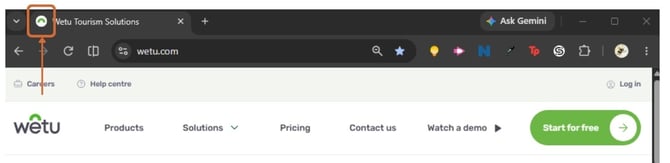
A favicon is the small icon displayed next to a website name in a browser tab. It helps users recognise your website and strengthens your brand identity.
Availability
The favicon feature is available exclusively to customers on the Enterprise Package.
Note: This feature will only be enabled once your Custom DNS has been successfully set up.
Find how to do this here: How do I set up a custom DNS for my Wetu links?
Image requirements
Ensure your image meets the following requirements before uploading.
| Requirement | Specification |
|---|---|
| Allowed file types | PNG, JPG, or JPEG |
| Required dimensions | 240 x 240 pixels |
| Maximum file size | 1 MB |
| Recommended design | A simple logo, image, or one to three characters of text |
Note: Favicons appear very small in browser tabs. Avoid detailed images or long wording.
How to upload a favicon
Step 1
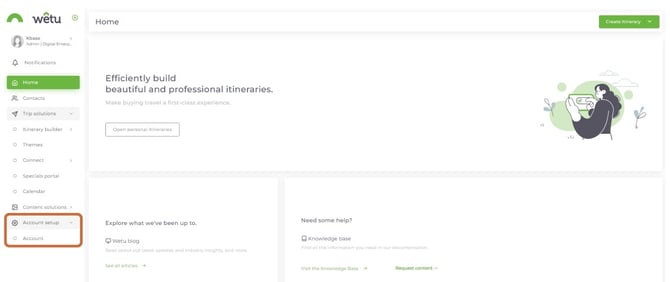
1. Log in to your Wetu account and select Account Setup from the left-hand navigation menu.
2. Select Account.
Step 2
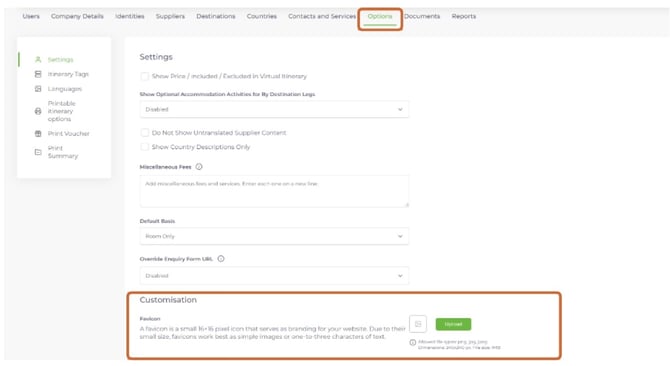
3. Select the Options tab.
4. Scroll to the Customisation section and locate the Favicon option.
5. Select Upload and choose your favicon image from your device.
Step 3
6. Select Save.
Your uploaded favicon will now display as the browser tab icon for your customised Wetu website.
Need help?
Email: support@wetu.com
Live chat: Available in your dashboard