
Quick Links
- Reset your password (logged out)
- Change your password (logged in)
- Creating a strong password
- Password security tips
- Troubleshooting
- Need help?
Reset your password (logged out)
If you can't log in because you forgot your password:
1. Go to the Wetu login page
2. Click Forgot Password? or visit Password Reset https://wetu.com/Site/Account/PasswordReset
3. Enter your registered email address
4. Click Send Reset Link
5. Check your email for the reset link
6. Click the link in the email
7. Enter your new password twice
8. Click Reset Password
.jpg?width=670&height=174&name=Wetu.%20Getting%20started%20(1).jpg)
Note: You can now log in with your new password.
Important: Use the email address registered to your Wetu user profile. The reset link expires after 24 hours.
Change your password (logged in)
If you're already logged in and want to update your password:
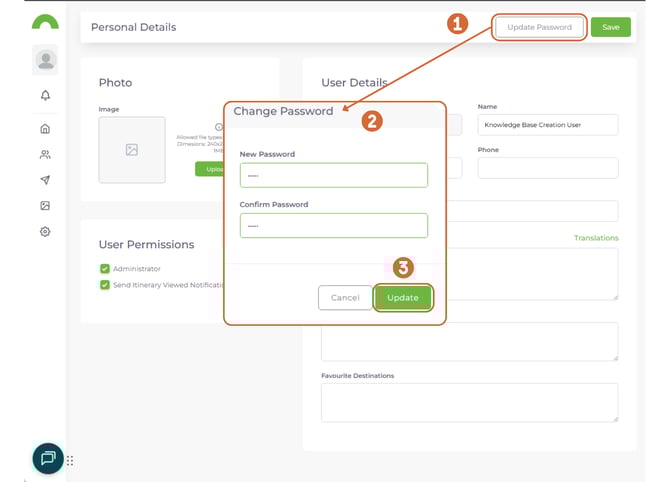
Option 1: From your profile
1. Click your profile icon (top-right corner)
2. Select My Profile
3. Click Update Password
4. Enter your current password
5. Enter your new password twice
6. Click Update
7. Click Save
Option 2: From Account Setup
Causion: Admin rights needed
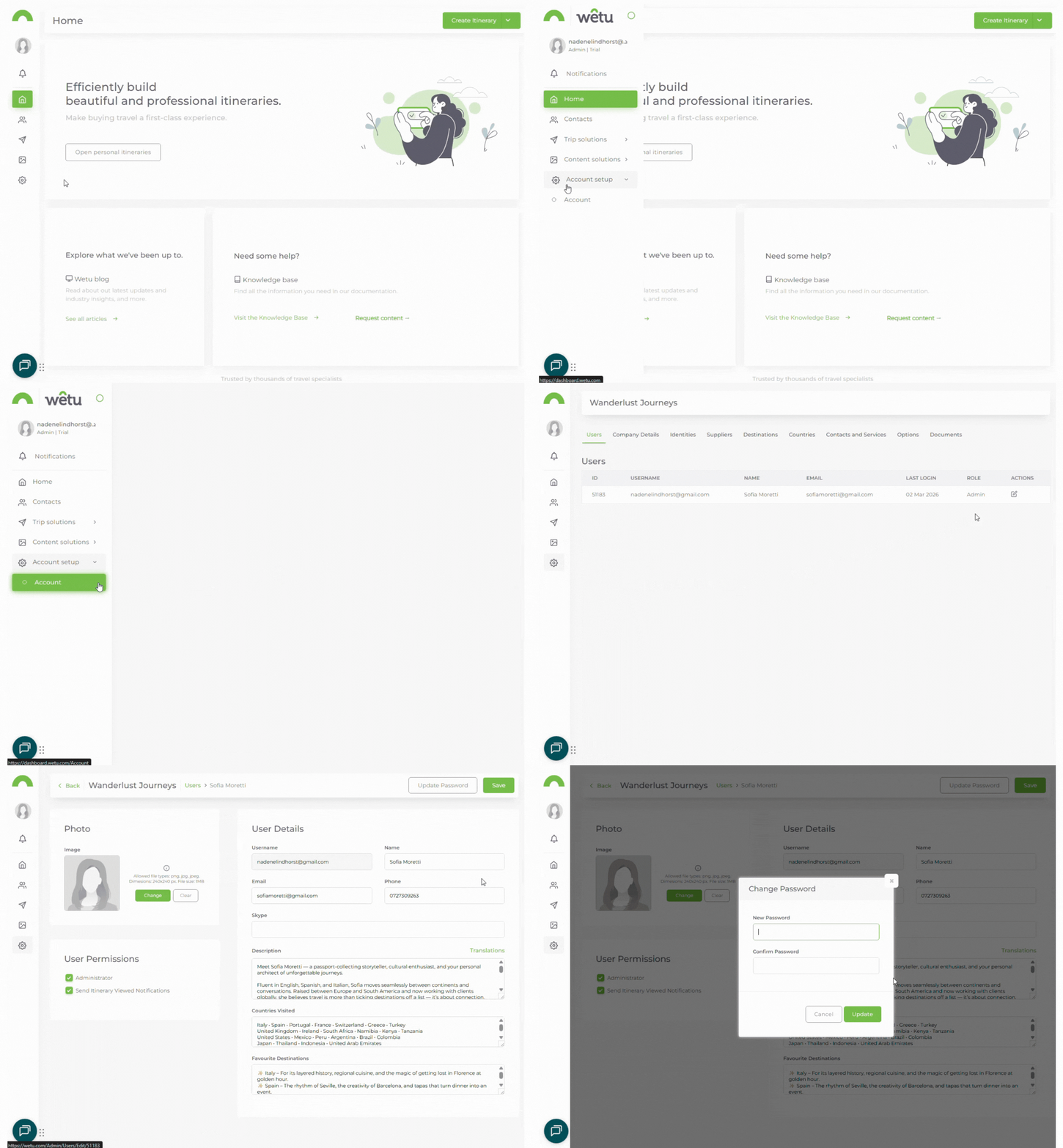
If you're an account administrator updating another user's password:
1. Navigate to Account Setup > Account
2. Go to the Users tab
3. Find the user and click Edit
4. ClickUpdate Password (top-right corner)
5. Enter the new password twice
6. Click Update
7. Click Save
Creating a strong password
Use these tips to create a secure password:
Do:
- Mix uppercase and lowercase letters
- Include numbers and symbols
- Make it at least 8 characters (12+ is better)
- Use a unique password for Wetu (don't reuse)
- Consider using a password manager
Don't:
- Use personal information (name, birthday, email)
- Use common words or phrases
- Reuse passwords from other accounts
- Share your password with others
Example of a strong password:
Tr@v3l!2024*Wetu (Don't use this exact one!)
Password security tips
Use a password manager
Tools like 1Password, LastPass, or Bitwarden generate and store strong passwords securely.
Watch for phishing
Never share your password via email. Wetu will never ask for your password by email.
Update regularly
Change your password every 3-6 months or immediately if you suspect it's been compromised.
Enable two-factor authentication (if available)
Add an extra layer of security to your account.
Troubleshooting
I didn't receive the reset email
- Check your spam/junk folder
- Verify you used the correct email address (the one registered to your account)
- Wait a few minutes - emails can be delayed
- Try requesting another reset link
- Contact support if still not received: support@wetu.com
The reset link isn't working
- Links expire after 24 hours - request a new one
- Make sure you're clicking the most recent reset email
- Try copying and pasting the link into your browser
- Clear your browser cache and try again
I don't know which email address is registered
- Contact your account administrator
- Or email Wetu support: support@wetu.com
I can't change another user's password
- Only account administrators can access Account Setup
- Contact your admin to request the change
- Or have the user reset their own password
Need help?
For password reset issues:
- Email: support@wetu.com
- Live chat: Available in your dashboard (if you can log in)
For account access issues:
- Contact your account administrator
- Or email Wetu support with your registered email address