
Quick Links
- Best devices for Wetu
- Supported web browsers
- Screen resolution requirements
- Internet speed requirements
- Before you start
- Keep your system updated
- Troubleshooting
- Need help?
-Quick reference
Best devices for Wetu
Recommended (best experience)
Desktop or laptop computers
- Windows PC
- Mac (macOS)
These devices provide full functionality and the best experience for creating and editing content.
Caution: We strongly recommend NOT using the Wetu builder on tablets and smartphones as functionality is limited. (iPad / Android tablets, iPhone / Android phones)
Supported web browsers
Always use the latest version of one of these browsers:
Desktop browsers:
- Google Chrome (recommended)
- Mozilla Firefox
- Microsoft Edge
- Safari (macOS)
Older browsers may not display Wetu correctly or may prevent features from working.
Tip: Chrome updates automatically and provides the most consistent experience across Windows and Mac.
Screen resolution requirements
Minimum: 1024 × 768
Recommended: 1280 × 800 or higher
Smaller screens (like mobile phones) display simplified layouts. Advanced editing features work best on larger screens.
Internet speed requirements
Wetu requires a stable internet connection.
Minimum speed: 5 Mbps download
Recommended: 10 Mbps or higher (especially when uploading photos or media)
Check your speed: Visit speedtest.net to test your connection.
Slower internet may cause:
- Longer loading times
- Delays uploading images
- Timeout errors when saving
Before you start
Make sure you have:
- [ ] A supported web browser (latest version)
- [ ] Stable internet connection
- [ ] Updated operating system
- [ ] Desktop or laptop for content creation
Keep your system updated
For security and best performance:
Update your browser regularly
- Chrome, Firefox, and Edge update automatically
- Safari updates with macOS system updates
Keep your operating system current
- Windows: Check Windows Update
- macOS: Check System Preferences > Software Update
Why updates matter:
- Security patches protect your account
- Bug fixes improve stability
- New features work properly
- Outdated systems may not be supported
Warning: Devices that no longer receive security updates may expose your account to risks.
Troubleshooting
Wetu isn't loading or looks broken
1. Refresh your browser - Press F5 (Windows) or Cmd+R (Mac)
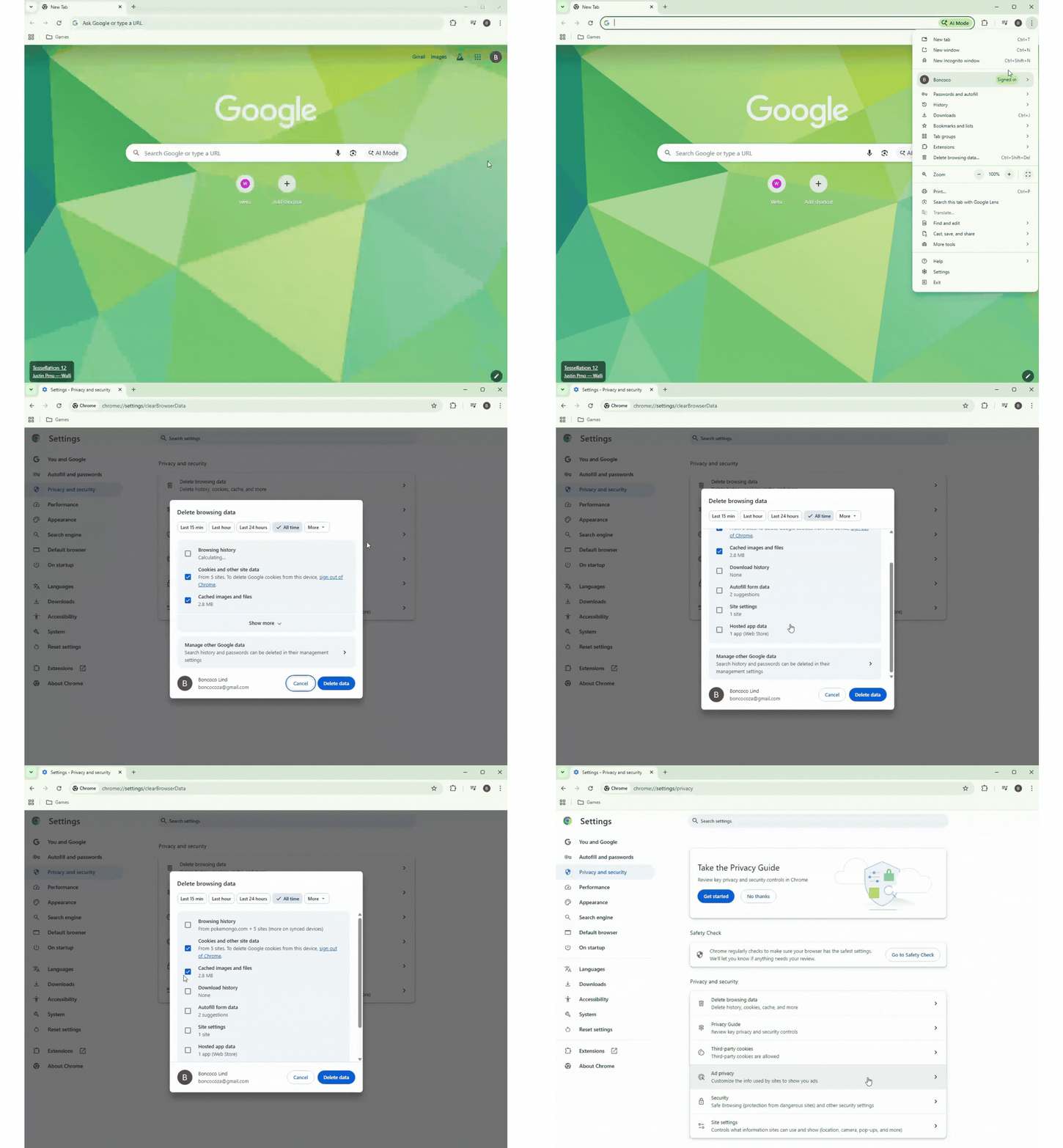
2. Clear cache and cookies:
- Chrome: Settings > Privacy > Clear browsing data
- Firefox: Settings > Privacy > Clear Data
- Edge: Settings > Privacy > Clear browsing data
- Safari: Safari menu > Clear History
3. Check your browser version - Make sure you're using the latest version
4. Try a different browser - Switch to Chrome if using another browser
5. Restart your device - Sometimes a simple restart fixes issues
Pages are loading slowly
- Check your internet speed (minimum 5 Mbps needed)
- Close unnecessary browser tabs
- Restart your router/modem
- Try during off-peak hours if on shared internet
- Contact your internet provider if speed is consistently slow
Features aren't working
- Make sure you're using a supported browser (Chrome, Firefox, Edge, Safari)
- Update your browser to the latest version
- Disable browser extensions temporarily (they can interfere)
- Try in an incognito/private window
- Clear your cache and cookies
I'm on a mobile device and can't edit
Mobile devices have limited editing capabilities. For content creation:
- Switch to a desktop or laptop computer
- Use a larger tablet if desktop isn't available
- Access from a computer at your office or a co-working space
Need help?
For technical issues:
- Email: support@wetu.com
- Live chat: Available in your dashboard
For IT administrators:
If you're setting up Wetu for your team, ensure:
- Latest browsers are installed
- Internet speed meets minimum requirements (5 Mbps)
- Firewalls allow access to wetu.com
- Pop-up blockers allow Wetu
Quick reference
| Requirement | Specification |
| Device | Desktop or laptop (Windows/Mac) |
| Browser | Chrome, Firefox, Edge, or Safari (latest version) |
| Screen | 1280 × 800 or higher |
| Internet | 5 Mbps minimum, 10 Mbps recommended |
| Updates | Keep browser and OS current |
Bottom line: Use a modern desktop/laptop with Chrome and a stable internet connection for the best Wetu experience.