
Quick Links
- Public profiles
- Private profiles
- Key things to keep in mind
- Need Help?
Public profiles
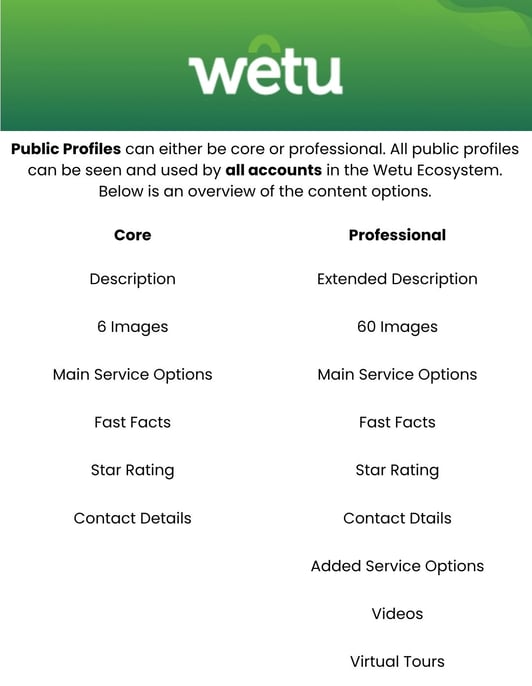
Public profiles are available to all users in the Wetu ecosystem. They are loaded on the public database and can be seen and used by all accounts.
Public profiles are divided into two types: Core and Professional.
Core Public Profile
A Core Profile has a limited amount of information that can be added.
Previously referred to as a Basic listing.
Professional Public Profile
A Professional Profile has a more comprehensive set of information that can be added.
- Includes an iBrochure output.
- Has access to the WetuShare function.
- Previously referred to as an Enhanced listing.
- To create a Professional Profile, you must be the owner or management company of the supplier profile.
Private profiles
Private Profiles are content you create for your own account only. Other operators using Wetu will not have access to them in their itineraries.
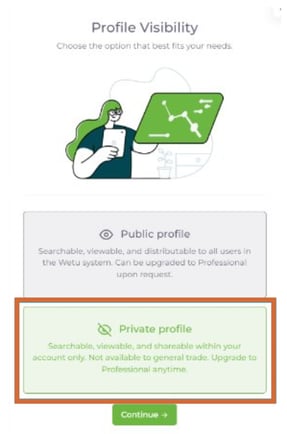
Important: When creating a Private Profile, you must select Private Profile at the end of the creation process. If you do not, it will be published as a Public Profile on the Wetu database.
Key things to keep in mind
- Duplicate profiles cannot be created. If a profile is listed as Public, a second Private version cannot be created for the same supplier.
- To customise a Public profile's content for your account, use the supplier content management guides.
- When creating Public profiles, you must be the owner of the supplier or service.
- All profiles require a minimum of 6 images to be uploaded before the profile can be completed.
- You must hold the applicable copyright permissions for all content uploaded to a profile.
Need Help?
- Support: support@wetu.com
- Live chat: Available in your dashboard