
This functionality is available on the Enterprise Package
What is custom DNS?
DNS (Domain Name System) setup allows you to change the URL structure of your Wetu links. Instead of all your itineraries, iBrochures, and Digital Catalogues starting with `wetu.com`, they can use your own custom subdomain.
Example transformation:
- Default: wetu.com/operator/itinerary/12345
- Custom: itineraries.wanderlustjourneys.com/12345
Benefits:
- Stronger branding: Links reinforce your company identity
- Professional appearance: Custom domains look more established
- Brand consistency: Everything stays within your domain ecosystem
- Trust and credibility: Clients recognize and trust your branded URLs
Who can use custom DNS?
Enterprise feature: Custom DNS is available exclusively on the Enterprise Package.
If you're not sure which package you have, contact your account manager at support@wetu.com.
Planning your custom domain structure
Before setting up DNS, decide which subdomains you want to use. You have two options:
Option 1: Distinct domains for each tool
Create separate subdomains for different Wetu outputs:
- Itineraries: itineraries.wanderlustjourneys.com
- iBrochures: brochures.wanderlustjourneys.com
- Digital Catalogues: catalogues.wanderlustjourneys.com
Best for: Companies that want clear separation between content types.
Option 2: Common domain for all tools
Use one subdomain for everything:
- digital.wanderlustjourneys.com (for itineraries, iBrochures, and catalogues)
Best for: Simplicity and unified branding across all outputs.
Tip: Most companies choose Option 2 for easier management.
Setting up custom DNS
Custom DNS setup requires coordination between you, your domain host, and Wetu.
Follow these three steps:
Step 1: Create your subdomains
Decide on your subdomain structure (see "Planning" section above).
Examples:
- itineraries.yourdomain.com
- digital.yourdomain.com
- travel.yourdomain.com
Caution: You must own the main domain
(e.g. yourdomain.com).
You'll create subdomains under it.
Step 2: Add CNAME records with your domain host
Contact your domain hosting provider (GoDaddy, Namecheap, Cloudflare, etc.) and ask them to add CNAME DNS records.
What to provide to your host:
For each subdomain you're setting up, create a CNAME record pointing to:
custom.wetu.com
Example configuration:
| Type | Name/Host | Value/Points To | TTL |
| CNAME | itineraries | custom.wetu.com | 3600 |
| CNAME | brochures | custom.wetu.com | 3600 |
Not technical? Most domain hosts have support teams who can add CNAME records for you. Just tell them: "I need a CNAME record for [subdomain] pointing to custom.wetu.com"
Step 3: Notify Wetu
Once your CNAME records are in place, contact Wetu support to activate your custom DNS.
What to include in your email to Wetu:
1. Your chosen subdomain(s)
- Example: itineraries.wanderlustjourneys.com
- Or: digital.wanderlustjourneys.com (for all tools)
2. How you want it configured
- Distinct domains per tool, or
- Common domain for all tools
3. Confirmation that CNAME records are live
- "I've added CNAME records with my host pointing to custom.wetu.com"
Send to: support@wetu.com
Subject line: "Custom DNS Setup Request - [Your Company Name]"
Timeline and activation
Setup time: Custom DNS configuration can take up to 72 hours to fully activate after Wetu configures your account.
Why the delay?
- DNS changes need to propagate across the internet
- Wetu needs to configure SSL certificates for your custom domain
- Security checks and verification must complete
Tip: Plan ahead! Start the DNS setup process at least a week before you need to use custom URLs with clients.
Custom DNS for agent identities
If you work with partners or agents who use Identities, you can set up custom domains for them too.
How it works
When an agent's Identity is applied to an itinerary, their custom domain appears in the URL instead of yours.
Example:
- Your domain: itineraries.wanderlustjourneys.com
- Partner's domain: trips.safaripartners.com
- When partner's Identity is applied → URL uses trips.safaripartners.com
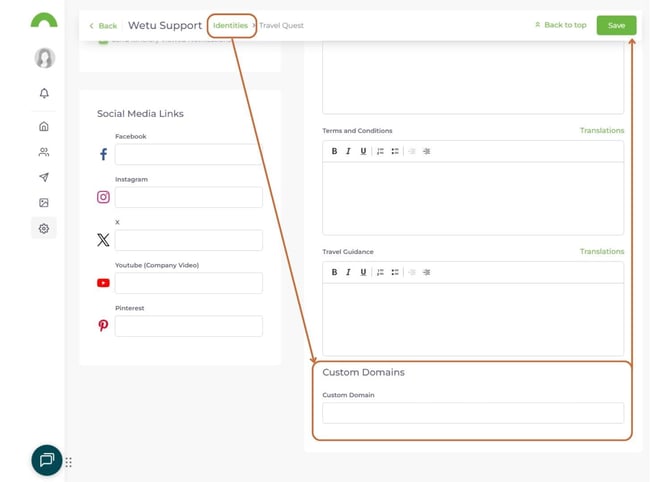
Setting up agent custom domains
The process is identical to your own setup:
1. Agent creates subdomain under their domain
2. Agent adds CNAME record pointing to `custom.wetu.com`
3. You notify Wetu with the agent's subdomain and Identity details
4. Wetu configures the custom domain for that Identity
Limitation: Each Identity can have one custom domain only. It applies to all their itineraries, iBrochures, and catalogues, you cannot set different domains per tool for Identities.
Default behavior without agent custom domains
If you don't set up custom domains for your agents:
- Agent-branded itineraries will use your custom domain
- Example: Even with Safari Partners' branding, the URL will be itineraries.wanderlustjourneys.com
This keeps everything under your domain while still showing partner branding in the itinerary content.
Examples of custom DNS in action
Here are real examples from Wetu clients:
iBrochure:
http://ibrochure.andbeyond.com/iBrochure/en/Launch/1224/andBeyond_Benguerra_Island/Landing
Itinerary:
http://tour.andbeyond.com/Itinerary/Landing/43F455A1-0FA0-48E3-A5A8-471AD6B064DC?m=d
Note: Notice how andbeyond.com appears in the URL instead of `wetu.com`, this is custom DNS in action.
Testing your custom DNS
After Wetu confirms your custom DNS is active:
1. Create a test itinerary in Wetu
2. Generate the itinerary link
3. Check the URL, it should start with your custom subdomain
4. Click the link to ensure it loads correctly
5. Verify SSL certificate shows as secure (🔒 padlock in browser)
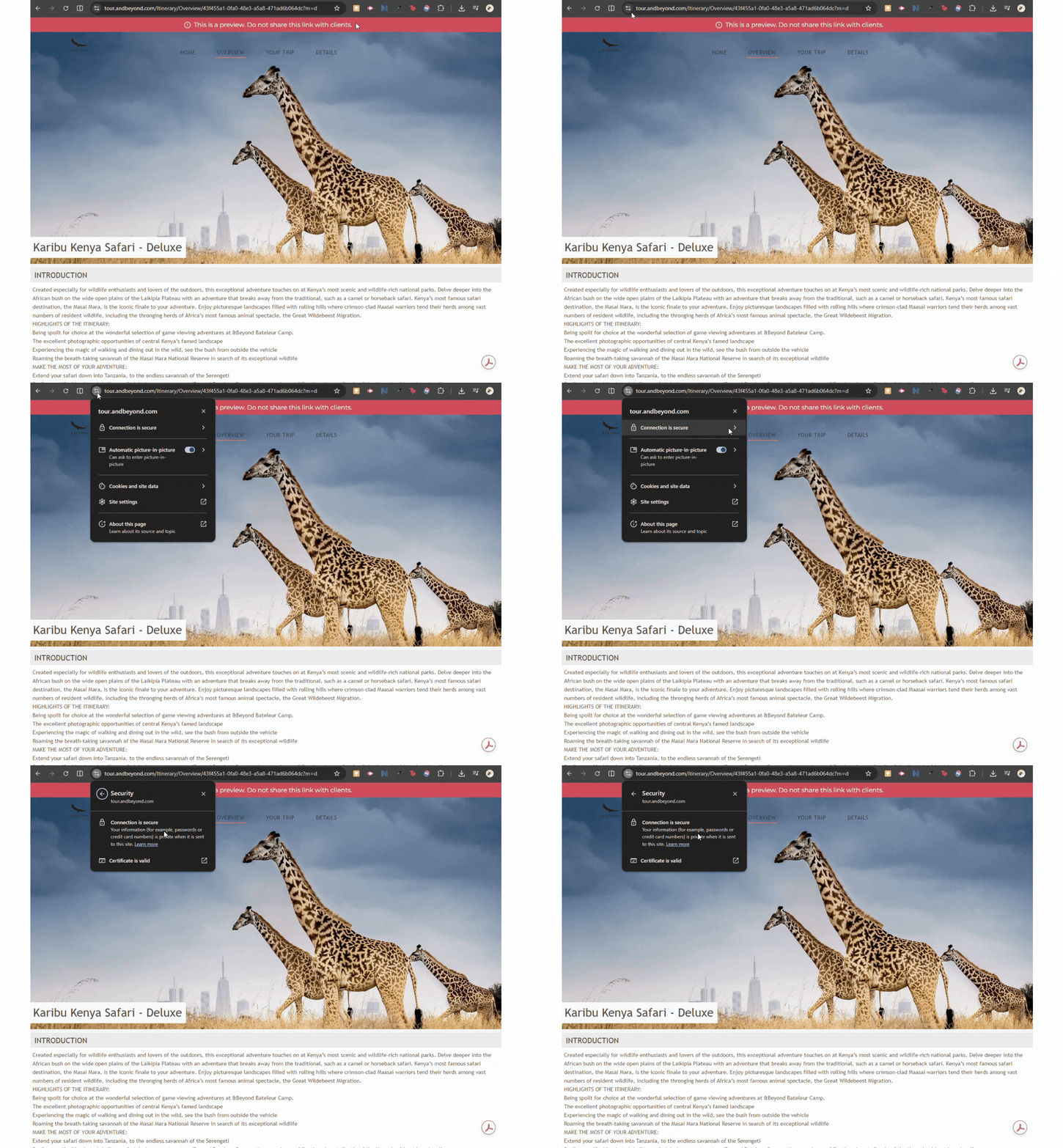
Note: If everything loads securely with your branded domain, you're all set!
Troubleshooting
My custom domain isn't working yet
- Wait the full 72 hours - DNS propagation can be slow
- Verify CNAME records are correct with your domain host
- Check you used the exact subdomain you told Wetu about
- Contact Wetu support if it's been longer than 72 hours
---
I'm getting SSL certificate errors
- Wetu automatically provisions SSL certificates for custom domains
- If you see security warnings, wait a few more hours for certificate activation
- Contact Wetu support if errors persist beyond 72 hours
---
Links still show wetu.com
- Make sure Wetu has confirmed activation on their end
- Try creating a new itinerary, old links won't retroactively change
- Clear your browser cache and try again
- Verify you're using the correct Identity (for agent domains)
---
Can I change my custom domain later?
Yes, but it requires going through the setup process again. Contact Wetu support with your new desired subdomain(s).
Need help?
Custom DNS setup can be technical. If you need assistance:
For domain/DNS questions:
- Contact your domain hosting provider's support team
- Most hosts can add CNAME records for you
For Wetu configuration:
- Email support@wetu.com
- Include your chosen subdomains and desired configuration
- Mention you're on the Digital Enterprise Package
Quick reference: Setup checklist
- [ ] Confirm you're on Enterprise Package
- [ ] Decide on subdomain structure (distinct or common)
- [ ] Create subdomain(s) with your domain registrar
- [ ] Add CNAME record(s) pointing to `custom.wetu.com`
- [ ] Verify CNAME records are live (check with domain host)
- [ ] Email Wetu support with subdomain details
- [ ] Wait up to 72 hours for activation
- [ ] Test with a new itinerary
- [ ] Verify SSL certificate is working
- [ ] Start using branded URLs with clients!