
Contact Us
Skip to content
  • There are no suggestions because the search field is empty.

What is the Trip Panel Activity tab?

The Activity tab in the Trip Panel shows a history of all actions and changes made to a trip. It helps you keep track of what happened, when changes were made and who made them.

Quick Links
- Open the Activity tab
-  What is recorded
-  Understanding an activity entry
-  Browsing trip activity
-  Why use trip activity
- Need Help?

 Open the Activity tab

  1. Open Trip Pipeline.
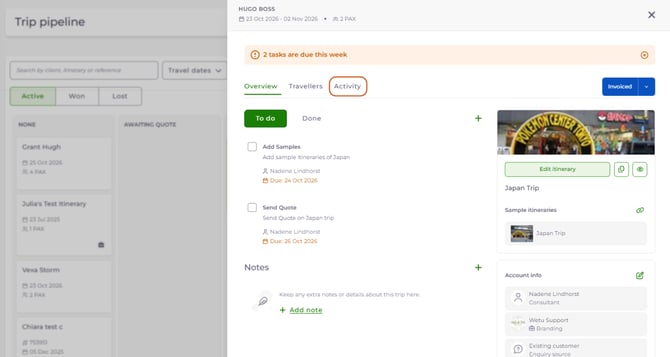
  2. Select the trip card for the trip you want to view. The Trip Panel opens.
  3. Select the Activity tab, next to Overview and Travellers.
1

 The activity history for that trip is displayed. 

back to top

 What is recorded 

 The Activity tab automatically records actions and updates made to a trip in Trip Pipeline: 

Activity Recorded when
Trip creation A new trip is created
Trip details Trip information is added or updated
Consultant changes The consultant assigned to the trip is changed
Branding changes The branding linked to the trip is updated
Traveller updates Travellers are added, edited or removed
Itinerary updates A personal itinerary is linked to or updated on the trip
Other trip updates Changes are made to the trip throughout its lifecycle

 Each activity is recorded automatically, so you can always see the trip's history. 

back to top

 Understanding an activity entry 

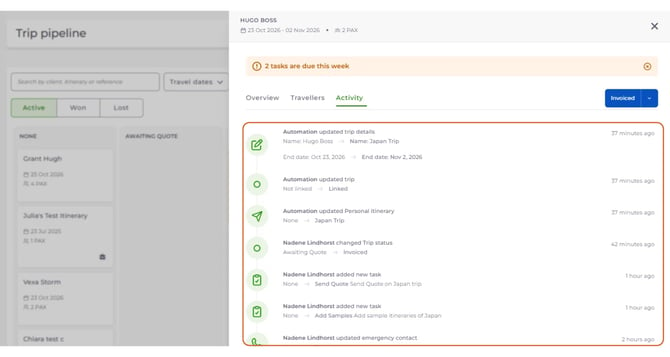
 Each entry in the Activity tab shows information about the action that took place: 
Part of the entry What it shows Example
Action performed A description of what happened Updated travellers, Updated branding
User or consultant The name of the person who made the change. Actions performed automatically by the system may show as Automation. Amanda Bailey updated travellers
Date and time A relative timestamp showing when the action happened 28 minutes ago, 2 days ago, 1 week ago
Details of the change The previous and updated values, where applicable Jim → Jim Denny shows that the traveller's name was changed from Jim to Jim Denny

2a

back to top

 Browsing trip activity 

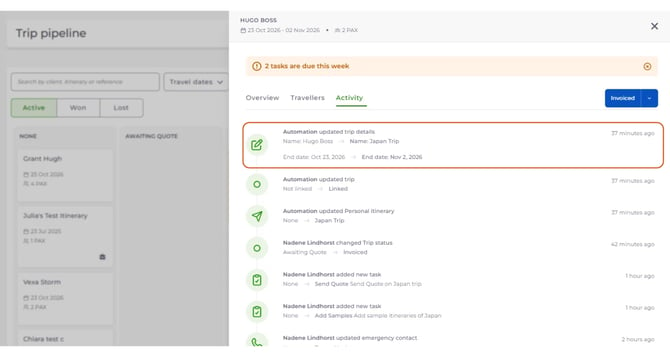
The Activity tab shows a scrollable history of changes, with the most recent activity at the top. Scroll down to view earlier actions and updates. 
2

 This lets you follow the history of a trip from its creation through to its latest updates. 

back to top

 Why use trip activity 

 The Activity tab is especially useful when several consultants are working on the same trip. It lets you: 

Benefit What it means
Track changes See what has been updated throughout the trip's lifecycle
Identify who made changes Understand which consultant or user performed an action
Review previous information See previous and updated values where available
Stay informed Quickly catch up on recent activity without asking colleagues for updates

 The Activity tab gives your team a shared view of the trip's history, so everyone stays informed and up to date. 

back to top

 Need help? 

 Contact Wetu Support at support@wetu.com. 
Chat to us Live on your dashboard

back to top