
Quick Link
- Who is Wetu for?
- What's included in your account?
- Trip Solutions
- Content Solutions
- Showcase Solutions
- For suppliers: What's in it for you?
- Where should I start?
- Quick start checklist
- What to explore next
- Tips for success
- Common first questions
- Getting help
Who is Wetu for?
Wetu is designed for:
- DMCs (Destination Management Companies)
- Tour operators
- Travel agents
- Suppliers (accommodation, activities, restaurants)
It streamlines sales and marketing workflows by connecting content, proposals, and client communication in one ecosystem.
What's included in your account?
Your Wetu account includes three main solution areas:
1. Trip Solutions (where most users begin)
2. Content Solutions (manage your content and products)
3. Showcase Solutions (supplier profiles and brochures)
Trip Solutions
This is the heart of your Wetu account - where you'll spend most of your time.
Itinerary Builder
Create professional digital itineraries in minutes.
You can:
- Build multi-day trips quickly.
- Use pre-loaded destination and supplier content.
- Share via clean web link.
- Export to Word if needed.
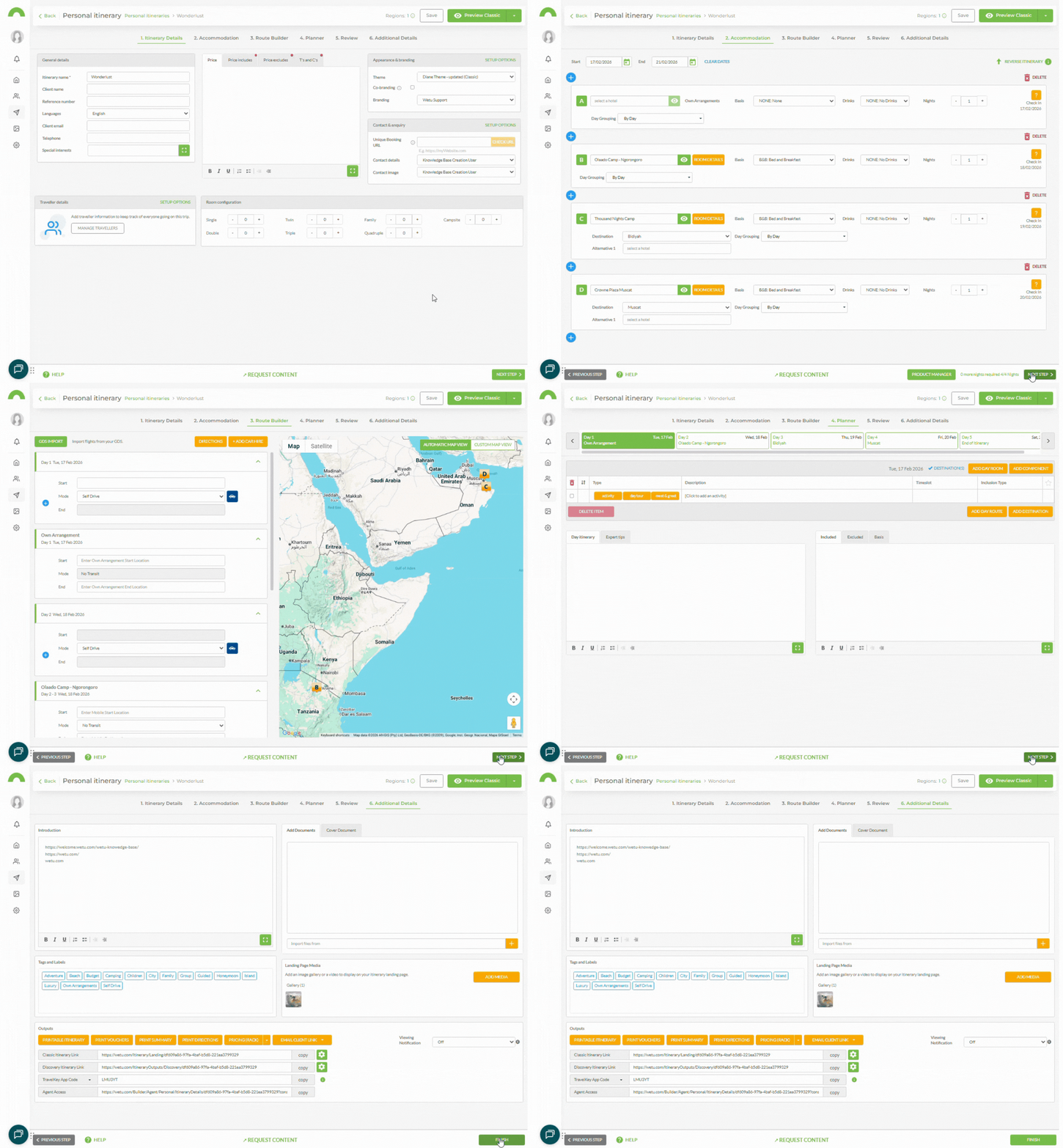
Most users start here - this is where you build and present proposals that convert.
TravelKey (Mobile App)
For travellers:
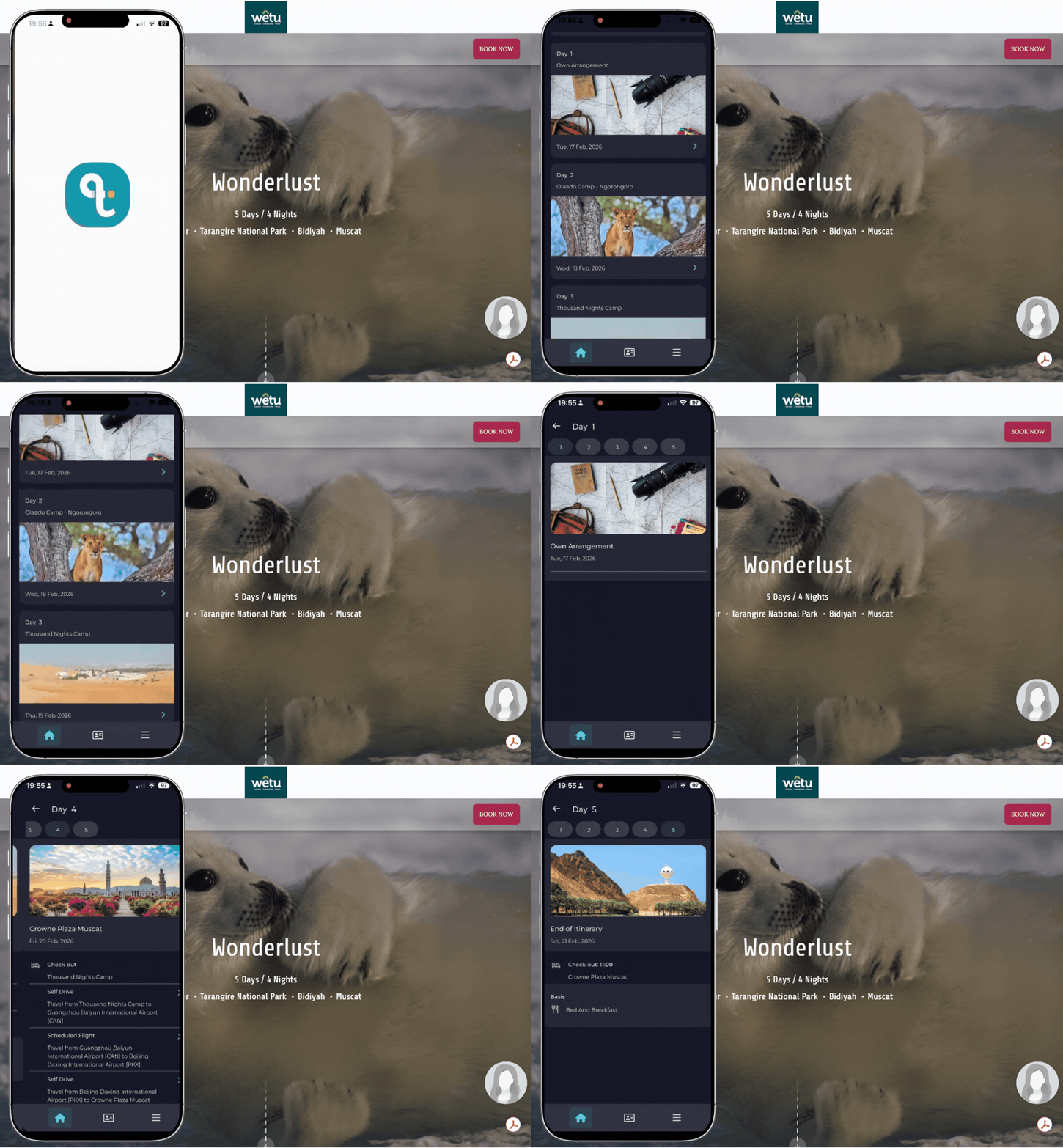
TravelKey allows clients to access their Wetu digital itinerary and travel documentation from their mobile device.
What travellers can access:
- Details about places they're visiting
- Destination information
- Country insights
- Contact details for all service providers
- Day-by-day itinerary on the go
Content Solutions
Manage your own company content and custom products.
Product Manager
Upload and control your own content.
You can:
- Upload your own images and descriptions
- Create custom products
- Control how your brand appears in itineraries
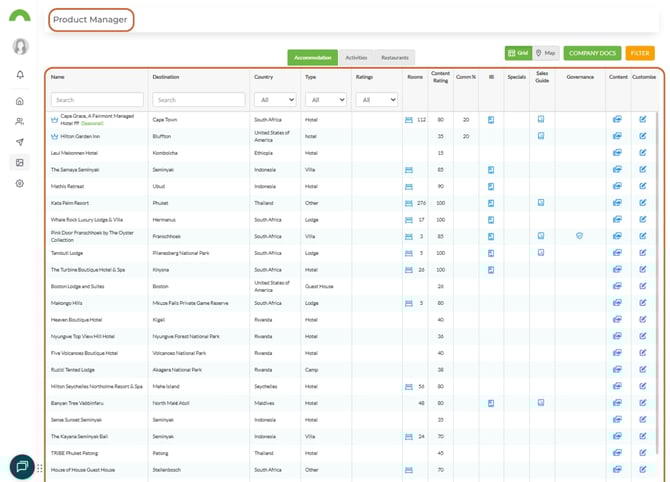
Why this matters: Your proposals reflect your business, not just shared industry content.
Contact Manager
Keep all traveller contacts in one secure place.
Features:
- Sync travellers directly from itineraries
- Store contact details securely
- Keep client communication organized
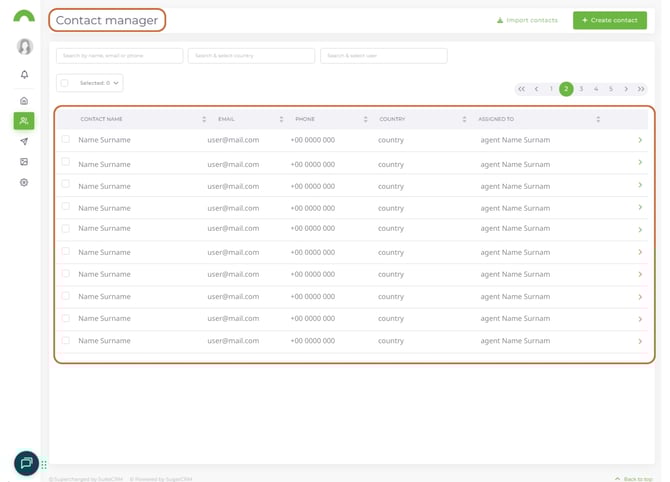
No more scattered spreadsheets or inbox searching.
Showcase Solutions
For suppliers to showcase their properties and services.
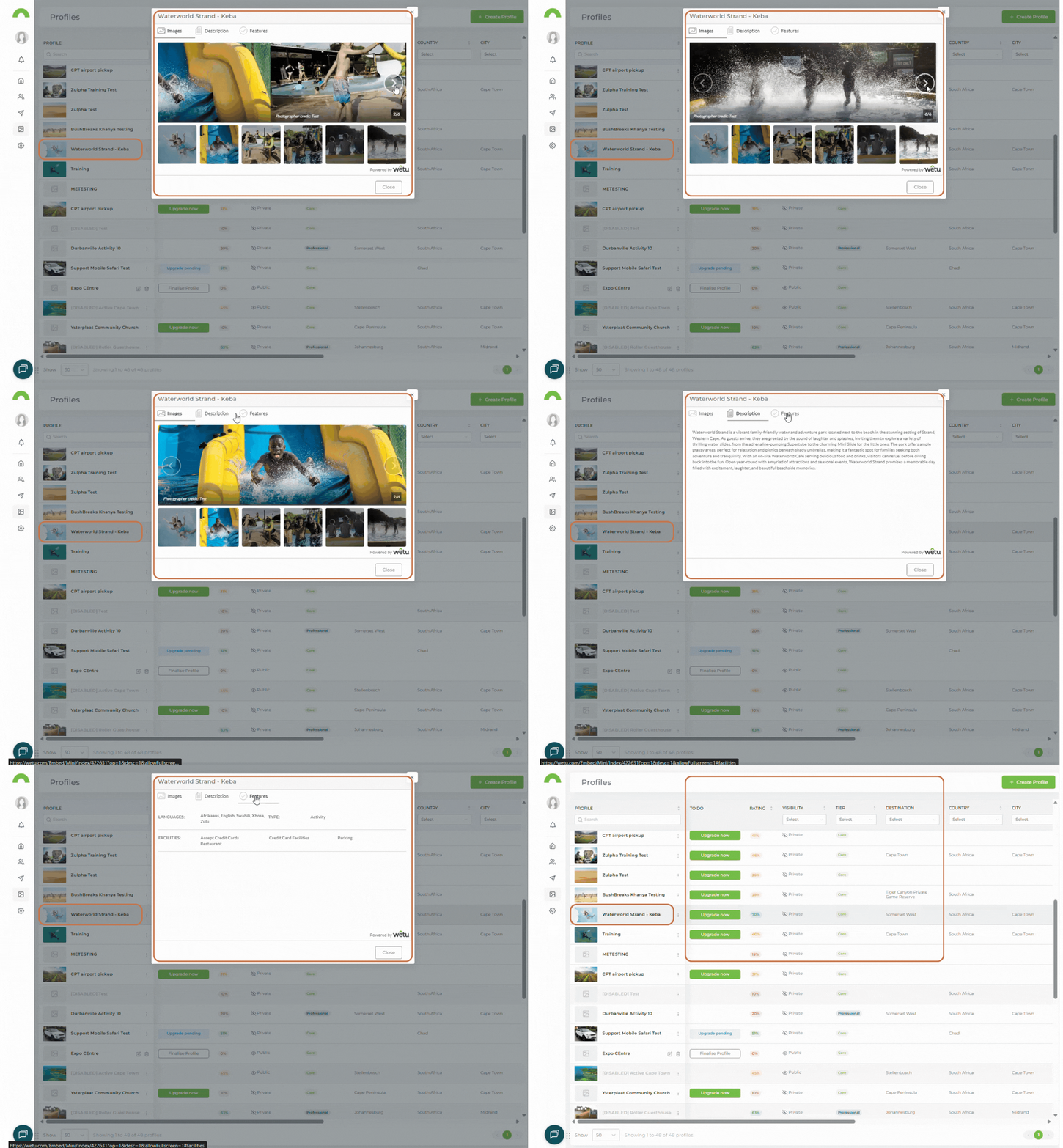
Profiles
Supplier profiles include:
- Images
- Descriptions
- Facilities
- Contact information
These can be inserted directly into itineraries to elevate proposals.
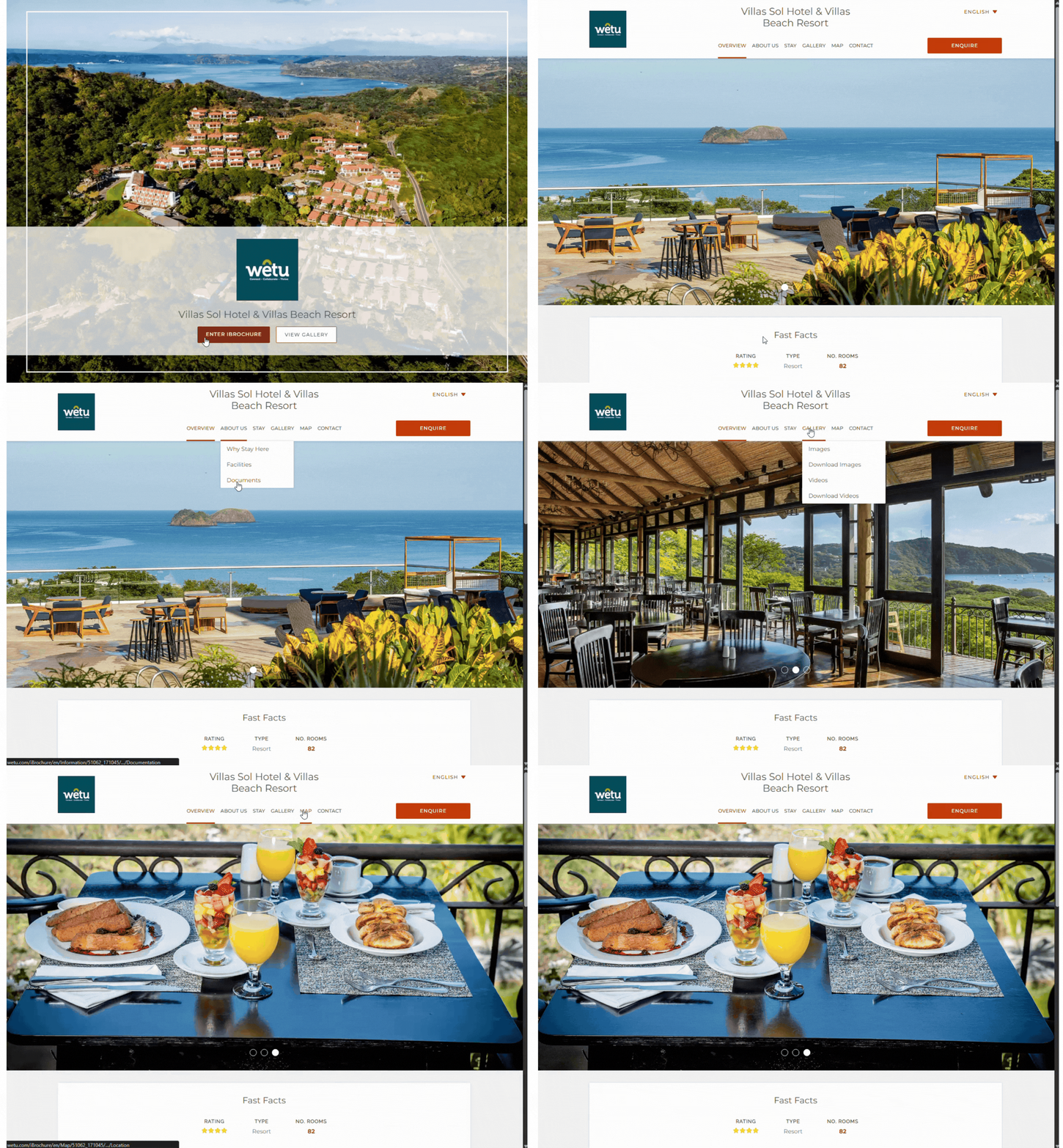
iBrochure
Create polished digital brochures to showcase products and experiences.
*Note: Only available to suppliers (or operators/DMCs) with public professional profiles. Regular operators cannot create iBrochures.
Catalogue Manager
Organize and distribute structured product content efficiently.
Especially useful for: Larger product portfolios.
For suppliers: What's in it for you?
If you're an accommodation, activity, or restaurant supplier, Wetu helps you:
- Get booked more often
- Stay top of mind with the trade
- Save time on back-and-forth emails
- Look professional
Your content appears directly inside itineraries used by operators and agents - putting you in front of the right audience at the right time.
Where should I start?
Here's the quickest path to getting value:
Step 1: Read the Getting Started Guide
Start here: Getting Started Guide
It's packed with practical tips to help you build your first trip quickly and beautifully.
Step 2: Update your company details
Set up your brand identity:
1. Navigate to Account Setup > Account > Company Details
2. Upload your logo
3. Add contact information
4. Update company description
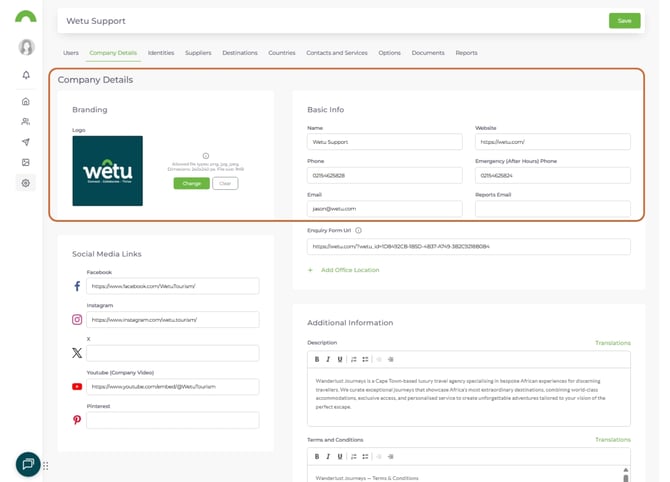
Why this matters: Clients recognize your brand and know how to reach you.
Step 3: Customize your branding (if available)
Theme Builder (plan-specific):
1. Go to Account Setup > Theme
2. Plug in your brand colors
3. Set fonts and styles
4. Preview changes
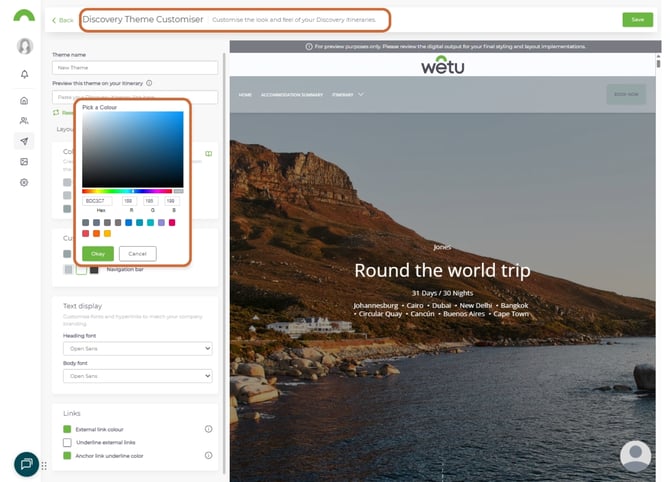
Your itineraries will match your brand perfectly.
Step 4: Build your first itinerary
Get hands-on experience:
1. Click "Create New Itinerary"
2. Add destinations and accommodation
3. Use existing supplier profiles
4. Customize with your branding
5. Share the link with a colleague or test client
This hands-on step builds confidence fast.
Quick start checklist
- [ ] Read the Getting Started Guide
- [ ] Upload your company logo
- [ ] Add contact information
- [ ] Set up brand colors (if available)
- [ ] Build a test itinerary
- [ ] Share with a colleague
- [ ] Get feedback and refine
What to explore next
Once you're comfortable with the basics:
For operators and agents:
- Explore Product Manager (custom content)
- Set up Contact Manager (organize clients)
- Try different itinerary themes
- Export to Word for offline sharing
For suppliers:
- Create or claim your profile
- Upload high-quality images
- Add detailed descriptions
- Consider upgrading to Professional profile for iBrochure
Tips for success
Start simple
- Don't try to learn everything at once
- Build one itinerary to understand the flow
- Add complexity as you get comfortable
Use existing content
- Wetu has thousands of supplier profiles ready to use
- Start with these before creating custom content
- Save time and focus on your value-add
Get feedback early
- Share test itineraries with colleagues
- Ask clients what they think
- Refine your approach based on responses
Explore features gradually
- Master Itinerary Builder first
- Then add Product Manager
- Contact Manager can wait until you need it
Common first questions
Q: Do I need to add all my products immediately?
A: No. Start with Itinerary Builder using existing content. Add your own products as needed.
Q: Can I try features before committing?
A: Yes. Build test itineraries and explore the platform. Most features are available in your plan.
Q: What if I get stuck?
A: Use the Getting Started Guide, contact support, or use live chat. The Wetu team is here to help.
Q: How long does it take to build an itinerary?
A: With existing content, you can build a professional itinerary in 10-15 minutes.
Getting help
Resources:
- Getting Started Guide: welcome.wetu.com/trip-solutions-getting-started-guide
- Support: support@wetu.com
- Live chat: Available in your dashboard
back to top
vs.1.0.13.03.2026