
Quick Links
- Access itinerary outputs
- Output types
- Choosing the right output
- Need help?
Access itinerary outputs
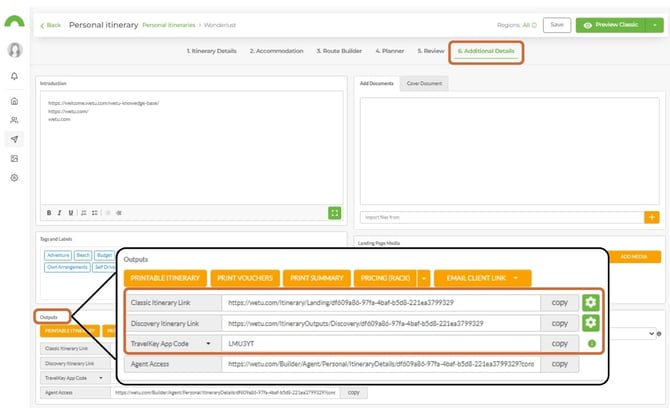
1. Open your itinerary in the Itinerary Builder.
2. Navigate to Step 6: Additional Details.
3. Scroll to the Outputs section.
4. Select the output you want to preview or share
Output types
Discovery ItineraryWetu's modern digital itinerary, a scroll-based, image-rich experience that guides clients through the journey visually. |
|
|
Includes
|
Ideal for
|
Classic ItineraryWetu's original tab-based digital itinerary, structured, information-rich, and easy to reference. |
|
|
Includes
|
Ideal for
|
Discovery LiteA streamlined version of Discovery for Lite users, modern scroll-based layout with a lighter, faster presentation. |
|
|
Includes
|
Ideal for
|
Note on availability: Lite users who signed up before June 2025 may have access to both Map Itinerary and Discovery Lite. Lite users who signed up after June 2025 have access to Discovery Lite only.
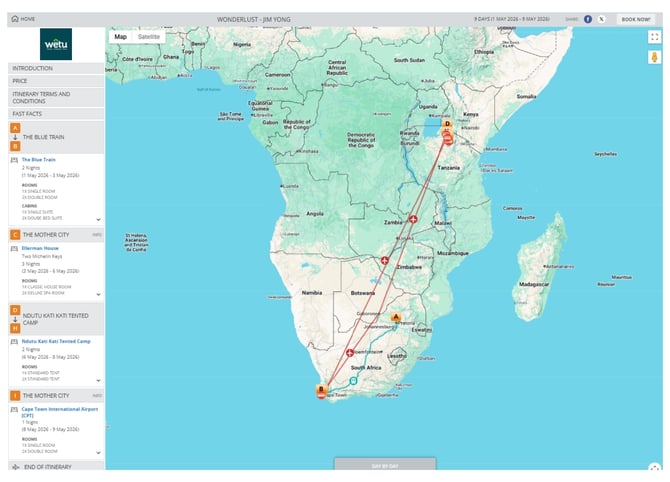
Map ItineraryWetu's older map-based itinerary layout, places the route and destination flow at the centre of the experience. |
|
|
Includes
|
Ideal for
|
Printable ItineraryA downloadable, print-friendly version of the itinerary in Microsoft Word format, suitable for PDFs, offline use, and physical travel packs. |
|
|
Includes
|
Ideal for
|
TravelKey AppWetu's mobile app for iOS and Android, gives travellers access to their itinerary offline using a code provided by their booking agent. |
|
|
Includes
|
Ideal for
|
Choosing the right output
| Output | Navigation style | Best for |
|---|---|---|
| Discovery | Scroll-based | Visual client presentations |
| Classic | Tab-based | Detailed itinerary reference |
| Discovery Lite | Simplified scroll-based | Lite digital itineraries |
| Map Itinerary | Map-focused | Route-heavy travel |
| Printable Itinerary | Document / PDF | Printed travel packs |
| TravelKey | Mobile app | Travelling clients |
Need Help?
- Contact Support: support@wetu.com
- Live Chat: Available on your Dashboard